From Generated Images to Fully Editable PSDs — Take Your Creative Workflow to the Next Stage
AI-generated images are automatically layered and exported as PSD files. Characters and backgrounds are separated into line art, base colors, shadows, and lighting—making editing and revisions simple and efficient. Discover copainter’s new feature designed for manga and animation production.
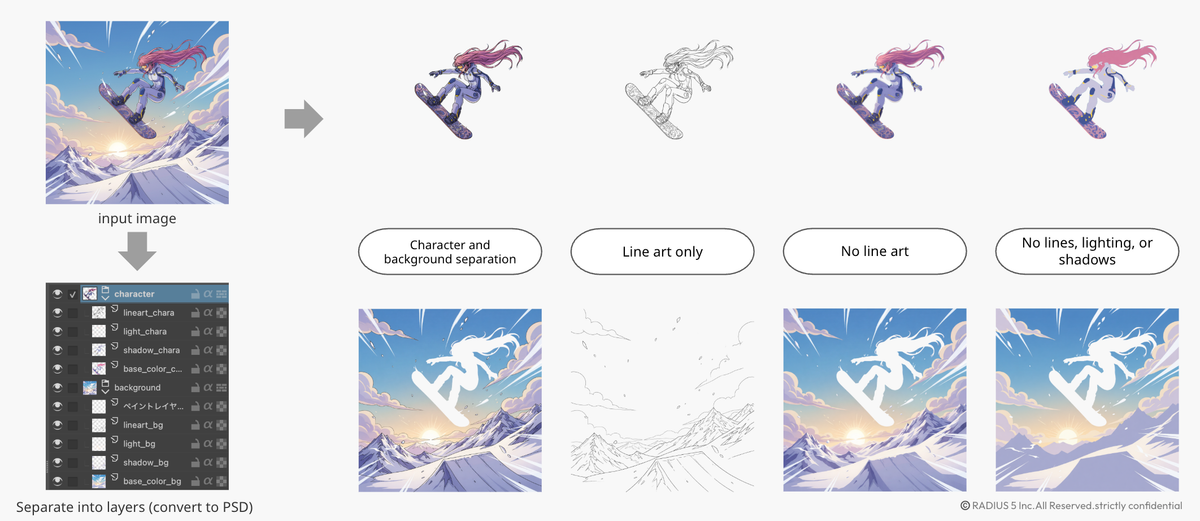
We have released a new feature in copainter: Layering AI.
With this feature, images generated by AI can be separated into character and background, and further broken down into individual elements such as:
- Line art
- Base colors
- Shadows
- Lighting
These elements can then be exported as a PSD file with the full layer structure preserved.
This transforms AI-generated images from “finished pictures” into fully editable creative assets.
Try copainter now
Why Is Layering Important?
Until now, most AI-generated images were exported as single-layer files such as PNG.
As a result, if you wanted to:
- Change only the character’s color
- Replace the background
- Strengthen the shadows
- Adjust only the line art
You had to repaint from scratch or manually cut out elements.
In other words, the cost of making revisions was extremely high.
How Layering AI Changes the Workflow
With copainter’s Layering AI, generated images can be exported directly as PSD files.
The structure is organized as follows:
■ Character
- Line art
- Base colors
- Shadows
- Lighting
■ Background
- Line art
- Base colors
- Shadows
- Lighting
This makes it possible to:
- Adjust only the character’s tone
- Modify background brightness
- Fine-tune shadow intensity with a click
- Emphasize lighting effects
All instantly within existing production tools such as Photoshop.
A Perfect Fit for Manga and Animation Production
This feature holds especially strong potential for manga and animation workflows.
For Manga Production
- Generate rough drafts at the storyboard stage and extract only the line art layer for refinement
- Make color corrections on final manuscripts
- Design tones separately for characters and backgrounds
Because generated images can now be treated as draft materials, both speed and flexibility improve significantly.
For Animation Production
- Separate characters and backgrounds into usable assets
- Adjust direction through lighting changes
- Maintain color consistency across scenes
AI-generated images, which were previously only usable as reference images, can now be integrated directly into the production pipeline.
From “Finished Output” to “Creative Partner”
Until now, AI-generated images were something you used as-is.
With Layering AI, they become assets that are:
- Editable
- Reusable
- Re-directable
This marks a shift from AI as a simple image generation tool to AI as a creative production partner.
Dramatically Reducing Revision Costs
Editing non-layered images required:
- Masking work
- Repainting
- Regeneration
- Composite adjustments
Layering AI significantly reduces these tasks.
As a result, creators can:
- Increase iteration cycles
- Expand creative freedom
- Shorten production time
- Spend more time improving quality
These are fundamental advantages for creators.
Expanding Creative Possibilities
copainter’s Layering AI is a powerful tool for:
- Illustrators
- Manga artists
- Animators
- Game background designers
- Independent creators
While leveraging AI, creators retain full control over the final expression.
Layering AI was developed as the infrastructure to make that possible.
Summary
AI-generated images are no longer just “finished illustrations.”
With copainter’s Layering AI, a new creative workflow becomes possible:
Generate → Layer → Edit → Reconstruct
Create more freely.
Create faster.
Create deeper.
We invite you to try copainter’s Layering AI today.