
nano banana can be used for creating illustrations! Here are some practical tips and recommended tools.
nano banana is a powerful AI for illustration creation. This article highlights useful features, key precautions, and introduces the safe tool “copainter.”
Google’s latest image-generation AI, “nano banana,” is attracting attention for its wide range of creative features, including facial expression variations, pose changes, and 3D-style transformations that are useful for illustration work.
For creators who think, “I want to make better use of my original characters” or “I want help with parts that are hard to do by hand,” nano banana is a powerful and reassuring tool.
In this article, we clearly explain why nano banana is well suited for illustration creation, how to use it effectively, and what precautions to keep in mind. At the end, we also introduce a tool that lets you use nano banana more safely and comfortably.
Try copainter, an AI illustration creation support tool (copainter / コペインター)
What is nano banana?
nano banana is a nickname for Google’s latest image AI, “Gemini 2.5 Flash Image.”
It excels at understanding images and can perform natural transformations and edits based on illustrations or photos. Features such as changing a character’s facial expression or pose, compositing backgrounds, and recreating three-dimensional textures make it especially appealing to illustrators.
One of its biggest strengths is its ability to reproduce the same character consistently across different scenes without breaking the design. This makes it well suited for producing assets for manga, games, and other creative projects. For creators who want to work more freely and efficiently, nano banana is quickly becoming an essential AI tool.
For more details on the basics of nano banana, see the article below:
What is nano banana? A complete guide to its features, pricing, and precautions
“Figure-style generation” goes viral on social media
One reason nano banana gained widespread attention is its ability to transform illustrations into “3D figure-style” images. By uploading a 2D illustration or image, the AI can recreate realistic lighting and textures, producing results that look like photos of actual figures.
This unique transformation spread rapidly on social media, sparking a boom in creator-generated posts.
For a detailed guide on how to create figure-style images, see the following article:
How to create figure-style images with AI: Using nano banana
Why nano banana is well suited for illustration creation
nano banana is more than just an image-generation AI—it has many features that directly support illustration workflows.
Key reasons it works so well for illustration include:
- High consistency in generation
- Multi-angle and perspective generation
- Natural-language prompt input
Let’s look at each in detail.
High consistency in character generation
One of the most important aspects of illustration generation is being able to repeatedly generate images without losing a character’s personality or atmosphere. nano banana understands defining features such as eyes, hairstyle, and clothing, allowing it to generate new poses or scenes that still feel like the same character.
This makes it ideal for manga assets, game sprites, and VTuber visuals that require the same character across multiple scenes.
That said, there are limits to consistency, and the AI may struggle with very complex poses or compositions—something users should keep in mind.
Multi-angle and perspective generation
nano banana is also useful when you need illustrations from different angles—front, side, back, or diagonal views.
By using a single base illustration, it can generate images from other perspectives, which is extremely helpful for character modeling and reference materials. Angles that would normally take a long time to redraw by hand can be handled naturally by the AI, greatly improving production speed.
Natural-language prompts
nano banana doesn’t require complex commands. You can give instructions in everyday language, such as:
- “Make the character smile”
- “Change the background to a night city”
- “Put them in a school uniform”
This intuitive input makes it easy for beginners to use, while professionals can use it for rapid prototyping and expanding creative possibilities. The ability to achieve high quality with simple prompts is a major reason for its popularity.
Practical ways to use nano banana for illustration creation
Here are some concrete examples of how nano banana can streamline illustration workflows:
- Creating facial expression variations from a single illustration
- Generating three-view character sheets from one image
- Combining characters from separate images into one illustration
- Specifying poses using rough sketches
- Coloring based on a color palette
If you want to start creating illustrations right away, try copainter, an AI illustration support tool that includes nano banana.
Try copainter, an AI illustration creation support tool (copainter / コペインター)
Creating facial expression variations from one illustration
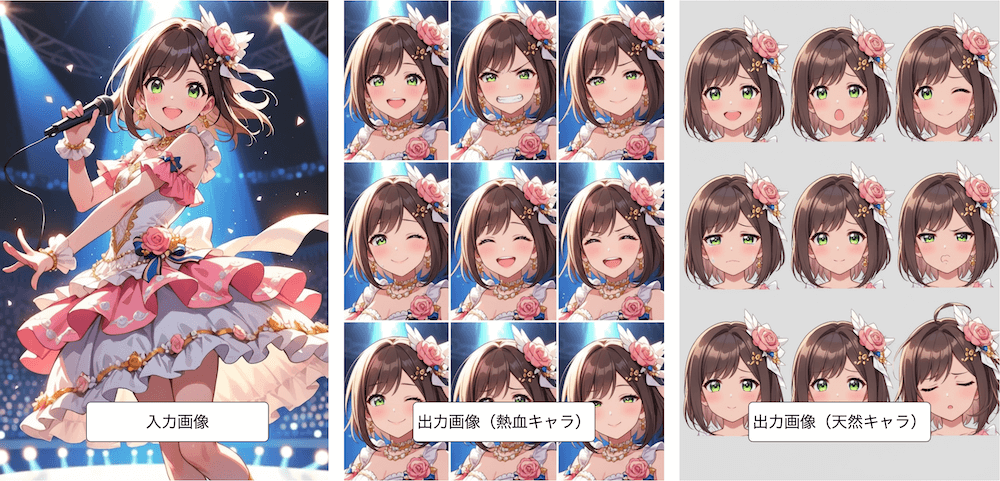
With nano banana, you can load a single illustration and generate different expressions—smiling, surprised, crying, and more—while preserving the original style. Subtle movements of the eyebrows and mouth are handled naturally.
This is ideal for game character sprites and VTuber assets, and it significantly reduces production time compared to drawing each variation by hand.
Generating three-view character sheets
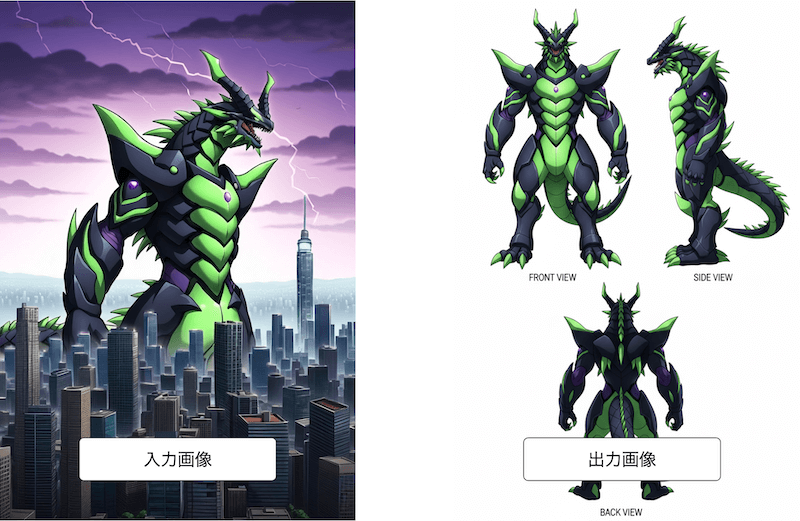
Three-view sheets (front, side, back) needed for character settings or modeling can also be generated from a single base image. While adjusting proportions by hand across angles is time-consuming, nano banana reconstructs the character in 3D while preserving key features.
This can dramatically reduce workload when creating game or animation design materials.
Combining characters from different images
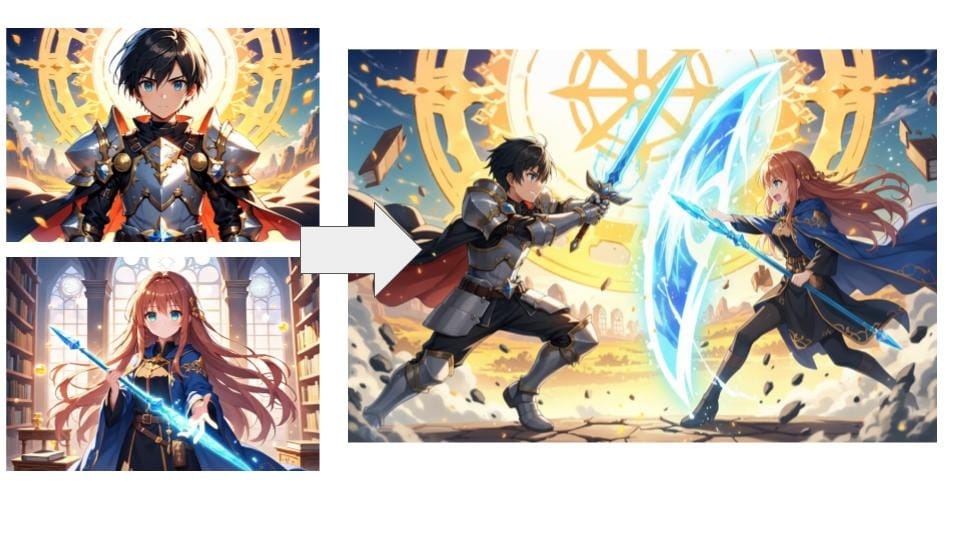
nano banana can merge characters drawn in separate illustrations into a single cohesive scene. It handles alignment and background blending smoothly, making it ideal for duo compositions or group scenes.
Tasks that normally require careful manual adjustment can be completed quickly, resulting in a unified and natural-looking illustration.
Specifying poses with rough sketches
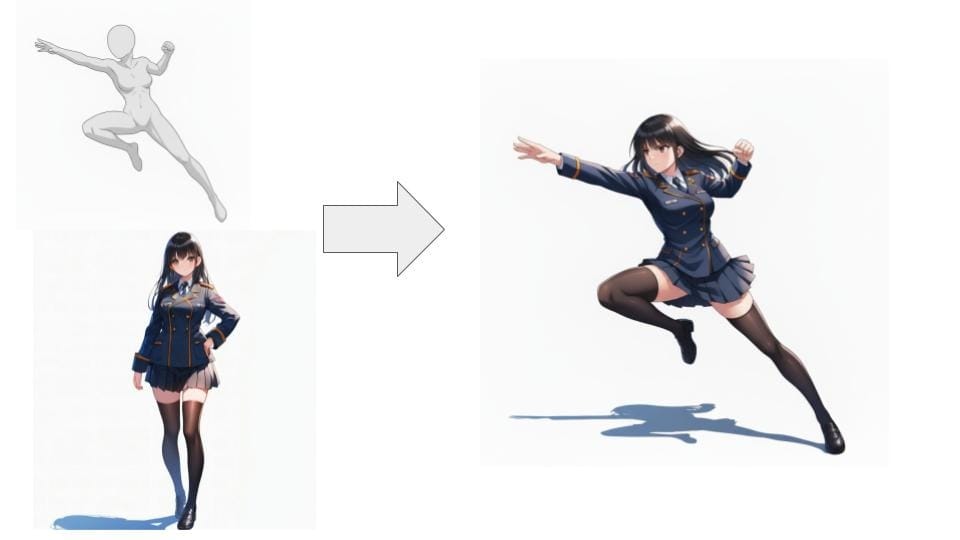
To change a pose, you can simply draw a rough sketch—or even a stick figure—as a guide. The AI will adjust the pose while maintaining the character’s appearance.
This allows you to move quickly from composition checks to near-final results, even if posing is usually a challenge.
Coloring with a color palette
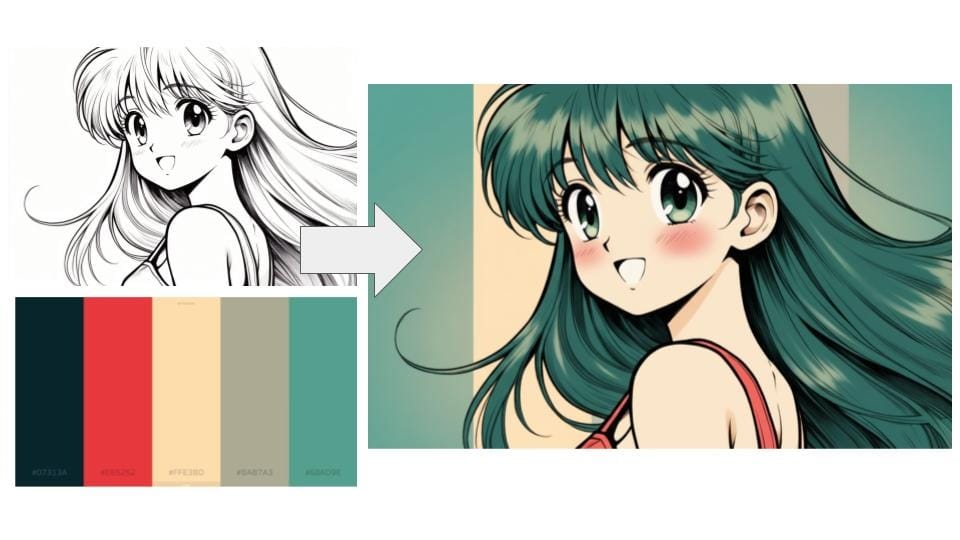
If you have specific color requirements, you can upload line art along with a color palette. nano banana will reflect the palette while balancing colors naturally.
This is especially useful for projects with fixed theme or brand colors, reducing the need for repeated recoloring and speeding up production.
Precautions when generating illustrations with nano banana
While nano banana is very powerful, there are important points to understand for safe use—especially regarding data handling and commercial use.
Creators working with valuable original characters should be aware of these risks and use the tool wisely.
Uploaded data may be used for AI training depending on settings
When using nano banana through Google’s consumer interface, uploaded images and generated outputs may be used for AI training depending on your settings.
For unreleased original works or client projects, this could pose a data-leak risk. If you want to avoid this, consider reviewing your settings or using a service like copainter, which explicitly does not use user data for AI training.
Image generation is not always perfect
Although nano banana offers high-quality generation compared to other AI tools, it cannot always produce results exactly as intended.
Because outputs are based on interpreting prompts, the illustration may sometimes lean toward a “nano banana–style” look rather than your original art style.
Commercial use has conditions
nano banana itself can be used commercially, but the conditions depend on how you access it. For business use, Google requires usage via Vertex AI.
If you plan to use it commercially, choosing a paid plan or an external tool that supports nano banana can help ensure safe production and publication.
Using nano banana for illustration creation with “copainter”
nano banana is extremely useful, but many users worry about data management or want a more efficient workflow. In such cases, copainter is a recommended illustration AI service that lets you use nano banana safely and effectively.
It offers a creator-friendly environment with features designed specifically for illustration work.
Benefits of copainter’s “AI Assistant” feature
copainter’s AI Assistant feature includes nano banana and allows you to easily perform tasks like expression variation, pose changes, and coloring.
Because it is built specifically for illustration creation, it handles dynamic compositions and complex edits naturally, helping you save time while maintaining quality. It’s easy to use for both beginners and professionals.
The AI Assistant feature is available even on copainter’s free plan. If you’re interested, try it from the link below:
Try copainter, an AI illustration creation support tool (copainter / コペインター)
User data is not used for AI training
copainter clearly states that uploaded images and generated data are not used for AI training. This makes it safe for original characters, early-stage designs, and confidential client work.
Easy aspect ratio adjustments
copainter supports changing aspect ratios for different uses, such as vertical images for social media, square icons, or horizontal web banners.
Instead of simple cropping, it preserves composition naturally, making it easy to optimize illustrations for multiple platforms.
Multiple illustration tools in one environment
In addition to the AI Assistant, copainter offers features such as:
- Image upscaling
- Image conversion
- Color correction
- Generating from rough sketches
Because everything can be done in one place, it’s easier to move from planning to final output without switching tools—improving efficiency and focus.
Make illustration creation more efficient with copainter
nano banana excels at consistent character generation and multi-angle illustration, making it invaluable for tasks like facial expressions and three-view sheets. At the same time, users must be mindful of data usage settings and commercial use conditions.
For those who want to use nano banana with confidence, copainter is an excellent choice. It offers a safe environment where data is not used for training, along with powerful illustration-focused features such as aspect ratio adjustments and AI assistance.
Use AI as your creative partner and enjoy a faster, more enjoyable illustration workflow.
Try copainter, an AI illustration creation support tool (copainter / コペインター)
![[Free Download] Chibi Character Battle Pose Collection — Free for Copainter Users, Including Commercial Use](/content/images/size/w720/2026/03/header_pose-collection_battle-of-deformation-character-1.png)
![[Free Download] Female Battle Pose Collection — Free for Copainter Users, Including Commercial Use](/content/images/size/w720/2026/03/header_pose-collection_battle-of-woman-1.png)
![[Free Download] Male Battle Pose Collection — Free for Copainter Users, Including Commercial Use](/content/images/size/w720/2026/03/header_pose-collection_battle-of-man-1.png)