
copainter’s AI Assistant has evolved — introducing the new “AI Assistant Pro” feature.
copainter has launched AI Assistant Pro (Beta), offering higher image quality, stronger editing tools, and better scene composition while keeping user data secure. It supports advanced, efficient, and professional creative workflows.
Thank you for using copainter.
To meet more advanced production needs, we’ve launched AI Assistant Pro (Beta)—an upgraded version of the AI Assistant.
How to Use
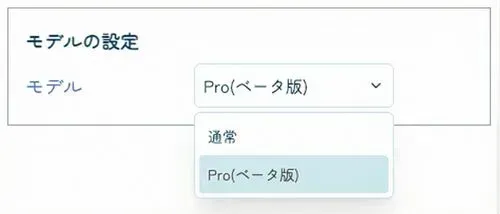
On the AI Assistant page, open Model Settings and simply select “Pro (Beta)” to use the Pro version.
- Tickets required: 5 tickets (same for all plans)
Built for Safe Use
Just like the standard AI Assistant, AI Assistant Pro does not use any user-uploaded data to train external AI models.
You can confidently upload important production data.
This design makes it safe to adopt in professional workflows for both companies and creators.
Key Improvements in AI Assistant Pro (Beta)
1) Higher Output Quality (image quality, realism, stability)
Pro significantly improves overall generation quality, including:
- Higher-detail rendering
- More natural textures and shading
- Fewer artifacts when upscaling
- Better consistency for people and characters
In particular, facial stability and the reproduction of background and prop details have improved—bringing the output closer to commercial-ready quality.
2) Much More Flexible Editing and Enhancement
Pro also strengthens its capabilities as an editing tool, enabling tasks that previously required advanced image editing software:
- Replace or remove backgrounds
- Color grading, noise reduction, HDR adjustments
- Change age, facial expression, makeup, and hairstyle
- Adjust season, weather, and lighting
- Add motion effects and blur
- Realistic transparency, shadows, and reflections
All within a single workflow.
3) Better at Scene Building and Complex Compositing
Pro is improved for composition and multi-element generation, such as:
- Referencing multiple images
- Expanding scenes
- Generating complex elements (buildings, nature, vehicles, etc.)
- Creating UI design elements
- Enhancing textures and correcting perspective
This works especially well for workflows that go from rough to final, helping even complex illustrations finish cleanly with fewer breaks.
Summary
- Safe-by-design, same as before
- Stronger quality and stability for both generation and editing
- Easier to keep character consistency and unified color tones for variations
- More powerful controls for composition, lighting, and backgrounds
- Greater efficiency through complex processing and automatic optimization
This update makes copainter even more convenient—please try copainter AI Assistant Pro.
![[Free Download] Chibi Character Battle Pose Collection — Free for Copainter Users, Including Commercial Use](/content/images/size/w720/2026/03/header_pose-collection_battle-of-deformation-character-1.png)
![[Free Download] Female Battle Pose Collection — Free for Copainter Users, Including Commercial Use](/content/images/size/w720/2026/03/header_pose-collection_battle-of-woman-1.png)
![[Free Download] Male Battle Pose Collection — Free for Copainter Users, Including Commercial Use](/content/images/size/w720/2026/03/header_pose-collection_battle-of-man-1.png)