
What Is Nano Banana? A Complete Guide to Its Best Uses, Pricing, and Key Things to Know
Nano banana (Gemini 2.5 Flash Image) enables high-accuracy edits—character consistency, compositing, natural prompts—but has watermark/data risks; copainter integrates it safely for illustration workflows.
Among image-generation AIs, one that’s drawing a lot of attention right now is “nano banana.”
Nano banana is the codename for Google’s latest AI model, “Gemini 2.5 Flash Image,” and it has become a hot topic as a generative AI that can edit illustrations and photos with unprecedented accuracy.
It can, for example, change scenes while keeping a character consistent, or combine multiple images to create new compositions—greatly expanding creative possibilities. In this article, we’ll explain nano banana’s strengths, how to use it, and important precautions. We’ll also introduce copainter, an AI illustration support tool that has evolved further by incorporating nano banana.
Try copainter, the AI illustration creation assistant (Copainter)
What is “nano banana”?
“nano banana” refers to Gemini 2.5 Flash Image, an AI model for image generation and editing. It originally started as a development codename, but the term spread on social media and became widely adopted.
Nano banana offers extremely high-quality image generation and editing, with standout strengths such as:
- Editing the same person/character across different scenes without their look falling apart
- Blending multiple images to create new compositions
This enables things that used to be difficult with earlier generative AIs, such as “creating a natural image that combines a specified background and person,” or “changing a character’s pose or outfit using natural Japanese instructions.”
Why nano banana became popular
On social media, posts like “my photo turned into a 3D figure” rapidly increased, and the name nano banana became widely known. It also gained attention in comparisons with other image-generation tools such as Adobe Firefly, particularly for its ability to edit faces and compositions without breaking them.
Another reason it attracted creators and social media users is that it supports natural-language prompting, making it feel more intuitive to use. In short, nano banana became a hot topic as a next-generation image editing tool by balancing usability and output quality.
Key strengths unique to nano banana
Nano banana is praised as an AI that delivers both naturalness and accuracy in image generation and editing. In particular, its precision in maintaining character consistency and preserving composition makes it highly attractive for creative work. Here are four strengths that set it apart:
- Generate while maintaining character consistency
- Excellent at compositing multiple images
- Fine-grained edits via natural-language prompts
- Accurate image generation powered by Gemini’s knowledge
Generate while maintaining character consistency
Nano banana is good at generating the same character across multiple scenes without major changes to facial structure or overall vibe. Because it recognizes a character’s features well, it can maintain a stronger sense of unity compared to older AIs—especially useful for illustrations and animation, where the same character appears across many cuts. It significantly improves the classic weakness of “the character turns into someone else after multiple generations.”
Excellent at compositing multiple images
Another feature is how naturally it can combine multiple images into a new composition. For example, you can prepare a character and background separately and merge them, or use a rough pose sketch as a reference to adjust a character’s pose. The AI also automatically balances lighting direction, shadows, and color tone, producing results so natural you may not notice they were AI-composited.
Fine-grained edits via natural-language prompts
Nano banana lets you give instructions in everyday language without relying on English or technical terminology. You can request subtle adjustments like:
- “Make it a little brighter”
- “Soften the expression”
- “Change the background to night”
Because you don’t need to memorize difficult prompts, it’s intuitive for anyone. You can reflect ideas quickly without disrupting your creative flow.
Accurate image generation powered by Gemini’s knowledge
Because nano banana is based on Google’s Gemini model family, it can generate accurate images grounded in broad knowledge. Even for specialized themes—like “a person wearing kimono” or “ancient Roman architecture”—it can produce depictions that feel closer to reality. Since the AI understands background knowledge, details like structure and texture are less likely to feel “off,” resulting in highly complete, realistic imagery.
What you can do with nano banana
Nano banana excels at advanced image editing based on existing illustrations or photos. It’s not only about generating new images—it’s especially strong at how to make the most of what you already have. Here are four common use cases:
- Generate “figure-style” images from illustrations
- Combine multiple characters/people into one image
- Create a three-view character sheet (front/side/back) from one illustration
- Mass-produce multiple variations from a single product image
Generate “figure-style” images from illustrations
A viral trend on social media was converting illustrations into realistic “3D figure-like” images. Nano banana is good at reproducing shading and material texture, creating results that look like photographs of real physical objects. In September 2025, some nano banana users shared prompts online, and generating and posting figure-style images became a major boom.
Combine multiple characters or people into one generated image
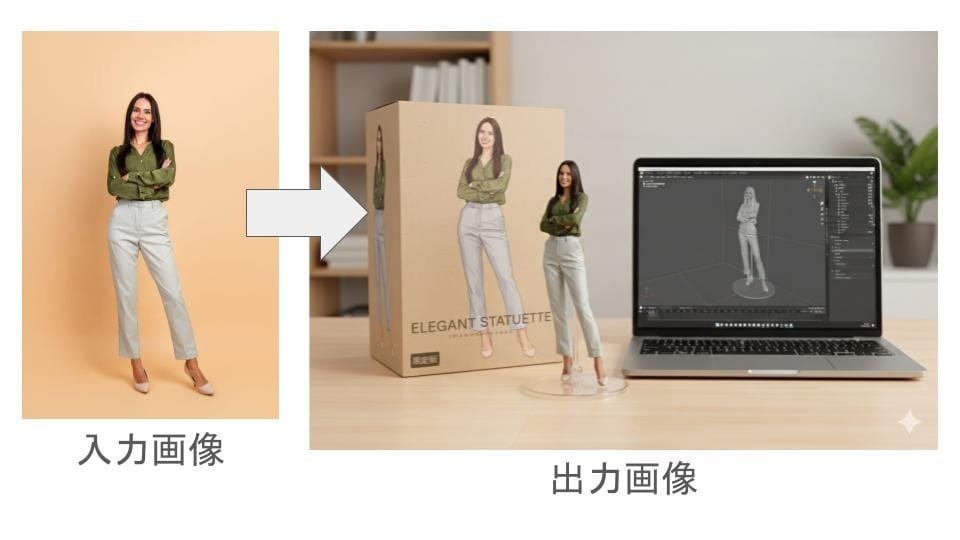
It can naturally merge separate characters or people into a single image—such as placing characters from different works into the same scene, or combining your own photo with an illustration. The AI adjusts light direction and color tone automatically, so the final result feels consistent. This is ideal for collaboration illustrations or commemorative visuals.
Create a three-view character sheet from a single illustration
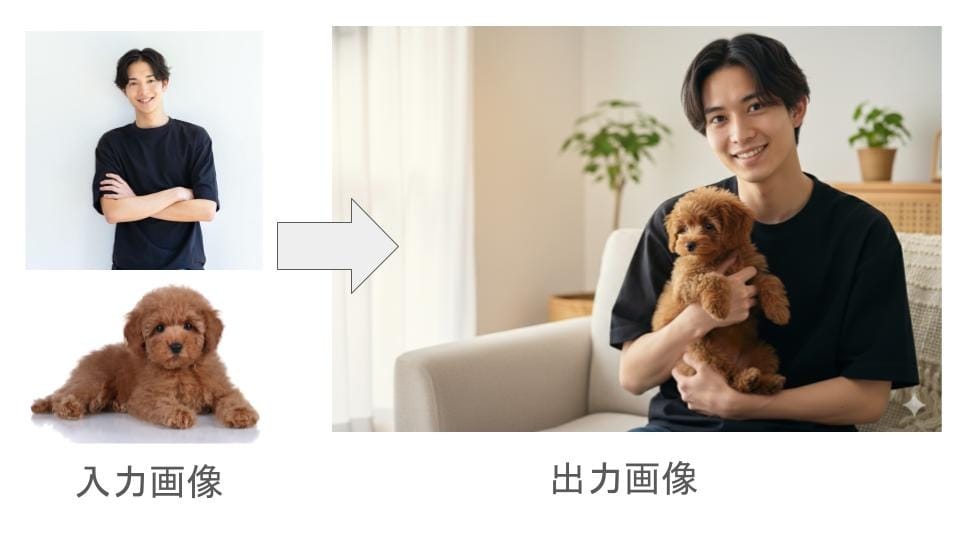
You can generate a front/side/back character sheet—essential for character design—starting from just one illustration. The AI understands the character’s 3D structure and recreates natural appearances from different angles. This speeds up character sheet creation (often time-consuming by hand) and is useful for animation pipelines and 3D modeling prep, while maintaining design consistency.
Produce multiple variations from one product image
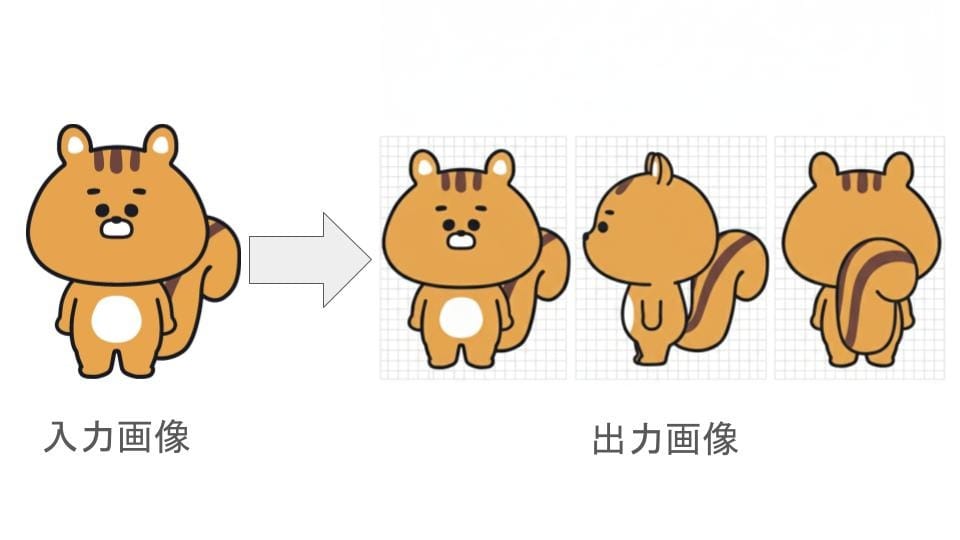
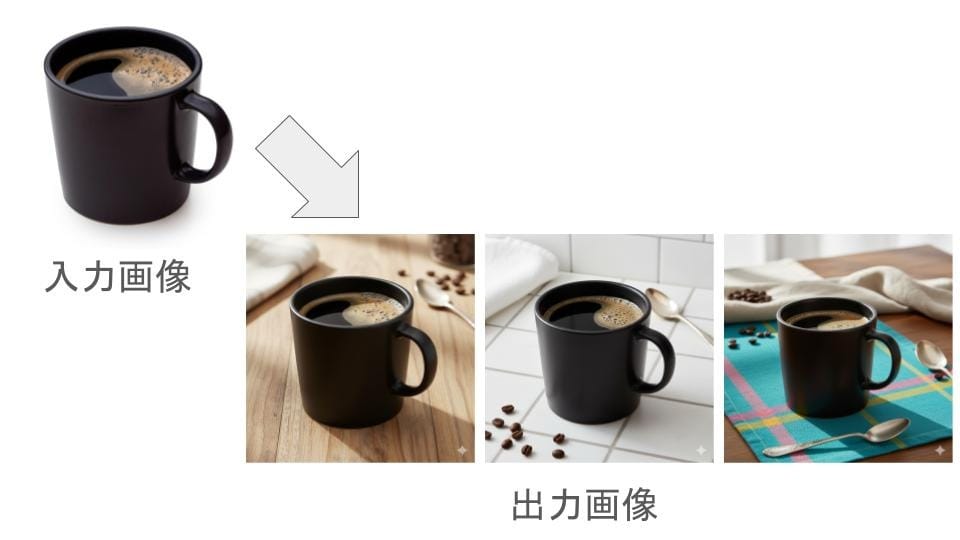
You can also generate multiple patterns from a product image by changing the background, color tone, or angle. For example, you can instantly create versions like “white background,” “wood texture,” or “on a tablecloth,” depending on your use case. It’s also good at compositing “a model’s side-face image + an earring-only image” to create a realistic wearing shot. This reduces shooting costs while increasing visuals for e-commerce and social media, making it highly useful for business.
How to use nano banana
There are several ways to use nano banana:
- Through the Gemini smartphone app or web version
- Directly via Google AI Studio
- Via external services or APIs that call its capabilities
If you have a Google account, you can start using Gemini or Google AI Studio right away—just log in. Since you only show an image and enter a prompt, no special setup is required. It’s accessible not only for developers, but for general users as well.
Can you use nano banana for free?
Yes—nano banana can be used for free inside Gemini and Google AI Studio. However, there may be limitations on the number of generations, resolution, and other factors, so if you want to use it seriously, a paid plan may be worth considering. You can still experience high-accuracy image generation for free, but higher-tier plans are convenient for long sessions or commercial use.
Plans (example):
| Plan | Monthly price (tax incl.) | Key features |
|---|---|---|
| Gemini Free | Free | Basic image generation/editing; usage limits apply |
| Gemini API | Pay-as-you-go | Can integrate image generation/editing into your own system via API (example: ~¥4,350 per 1M tokens) |
| Gemini AI Pro | ~¥2,900/month | Higher accuracy, long prompts, priority processing, etc. |
| Gemini AI Ultra | ~¥36,400/month | Access to the highest-performance model, plus priority processing |
Source: Gemini official
If you want more flexible usage of nano banana, we recommend choosing services that support API/external integration—such as copainter.
Important precautions when using nano banana
Nano banana is extremely useful, but there are key points you should keep in mind—especially for commercial work or anything you plan to publish publicly. Here are three major precautions:
Images generated in the Gemini app include a watermark
Images generated in the Gemini app include a watermark in the bottom-right. This is one of Google’s safety measures to indicate AI-generated content. If you post on social media, the watermark may affect appearance. If you want to use nano banana without a watermark, you’ll need to use an API or an external service.
Check whether generated images infringe on copyrights
Because nano banana is highly capable, certain prompts may produce images that resemble existing works or public figures. Before publishing or selling, it’s important to confirm there are no issues with copyright, portrait rights, or related concerns.
In the viral “figure-style” trend, there were also many cases where real toy manufacturer logos appeared in generated images. Even if an AI creates the image automatically, the user may still be responsible—so it’s safest to check terms and laws carefully for commercial use.
Uploaded data may be used for model training depending on settings
When using nano banana directly, your uploaded images or generation history may be used for model training depending on your settings—meaning your data could be used to improve the AI. This is particularly important for studios handling unreleased anime/game assets. If you want to avoid training usage, consider services designed not to use user data for AI training—such as copainter.
If you want to create illustrations with nano banana, choose copainter
Nano banana is a powerful model, but some users feel uneasy about limitations and data handling when using it directly. For those users, we recommend copainter’s AI Assistant feature.
copainter’s AI Assistant includes nano banana and offers services specialized for illustration creation. Here are three benefits:
- Images used in prompts and generated results are not used for AI training
- You can change aspect ratio freely
- Packed with illustration-focused features
The AI Assistant is available even on copainter’s free plan—if you’re interested, start here:
Try copainter, the AI illustration creation assistant (Copainter)
Prompt images and results are not used for AI training
copainter does not use user-uploaded images or generated illustrations as AI training data. This is clearly stated on the official site and provides major reassurance for creators who care about privacy and data confidentiality. Your works and original characters won’t become third-party training data, making it safe for commercial and commissioned projects.
Aspect ratio changes are supported
copainter lets you freely change aspect ratio—for vertical social posts, horizontal headers, and more. Available aspect ratios in the AI Assistant include:
- Square (1:1)
- Portrait (3:4, 9:16)
- Landscape (4:3, 16:9)
- Ultra-wide (21:9)
- Ultra-tall (9:21)
The AI automatically adjusts composition, so characters and backgrounds don’t become awkward. You can output well-balanced images without tedious manual cropping.
Packed with illustration-focused features
In addition to nano banana-powered editing, copainter includes many tools specialized for illustration: line-art assistance, underpainting support, upscaling, image conversion, and more. By combining these features, you can produce high-quality works in less time—making it suitable for everyone from beginners to professionals.
Summary
Nano banana is a next-generation image generation AI that combines high editing accuracy with intuitive, natural-language operation. It offers many capabilities useful for illustration production, such as character consistency, multi-image compositing, and fine-grained edits via everyday prompts. On the other hand, there are important considerations like watermarks and data usage. If you want to address these concerns, copainter is recommended: your data isn’t used for AI training, and commercial use is safer—so you can fully leverage nano banana’s power while enjoying creation with peace of mind.
Try copainter, the AI illustration creation assistant (Copainter)
![[Free Download] Chibi Character Battle Pose Collection — Free for Copainter Users, Including Commercial Use](/content/images/size/w720/2026/03/header_pose-collection_battle-of-deformation-character-1.png)
![[Free Download] Female Battle Pose Collection — Free for Copainter Users, Including Commercial Use](/content/images/size/w720/2026/03/header_pose-collection_battle-of-woman-1.png)
![[Free Download] Male Battle Pose Collection — Free for Copainter Users, Including Commercial Use](/content/images/size/w720/2026/03/header_pose-collection_battle-of-man-1.png)