
Change Composition and Angles While Keeping Background Consistency! How to Streamline Manga and Anime Production with copainter’s AI Assistant
copainter’s AI Assistant lets creators quickly change background composition and camera angles while preserving consistency, greatly reducing workload for manga, anime, games, and webtoons.
How to Change Composition and Camera Angles While Maintaining Consistency with the AI Assistant
Change Composition and Angles While Keeping Background Consistency!
How to Streamline Manga and Anime Production with copainter’s AI Assistant
In manga, anime, and game production, backgrounds are a crucial element that supports the world of the story. Cityscapes, classrooms, and natural scenery all help characters feel alive and make the narrative more convincing.
However, manually redrawing the same background from different angles is extremely time-consuming. Creating variations in perspective or time of day can take an enormous amount of effort.
That’s where copainter’s AI Assistant comes in. In this article, we’ll explain how to efficiently change background compositions using AI, along with its benefits and practical tips.
Note: The “Angle Conversion AI” was released in February 2026. It allows for more accurate camera angle adjustments, so please refer to this article as well.
What Is copainter’s AI Assistant?
copainter’s AI Assistant is a powerful feature designed to support creators. In addition to generating turnaround sheets and facial expression variations for character design, it can also change background composition and camera angles.
By generating new images based on the original illustration while maintaining consistency, the AI allows you to quickly obtain new background cuts—as if the camera angle were changed—without breaking buildings, city layouts, or natural elements.
Benefits of Changing Background Composition with the AI Assistant
1. Dramatically reduced production time
Previously, redrawing the same background from a different angle could take days. With the AI Assistant, you can generate multiple composition variations in just minutes.
2. Maintained consistency
Perspective and layout are less likely to break, allowing you to change angles while preserving the same world. This is ideal for series works and sequential panels.
3. Lower revision costs
Because the composition stays faithful to the original background, the need for major manual corrections is reduced, significantly improving workflow efficiency.
AI Assistant Examples
Changing cityscape angles
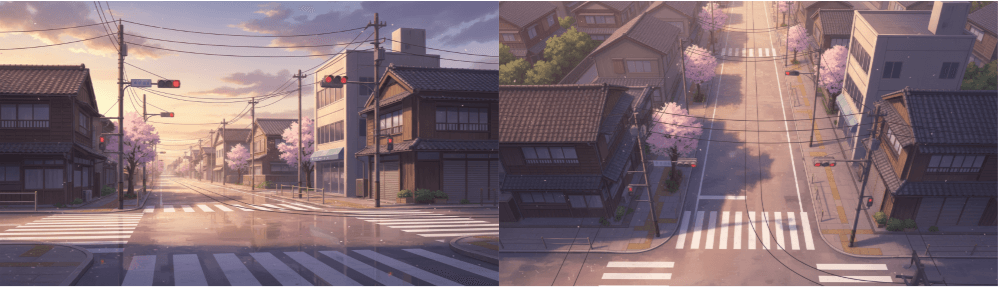
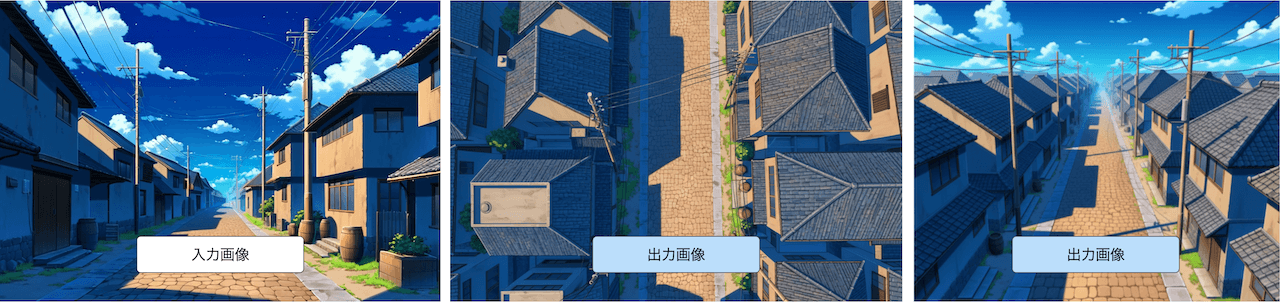
In manga and anime, it’s common to boost expressiveness by changing camera angles while keeping the same buildings. Doing this manually is costly, but with the AI Assistant, you can simply prompt:
“Change to a bird’s-eye view”
and the buildings will remain consistent while the angle changes.
Changing interior angles
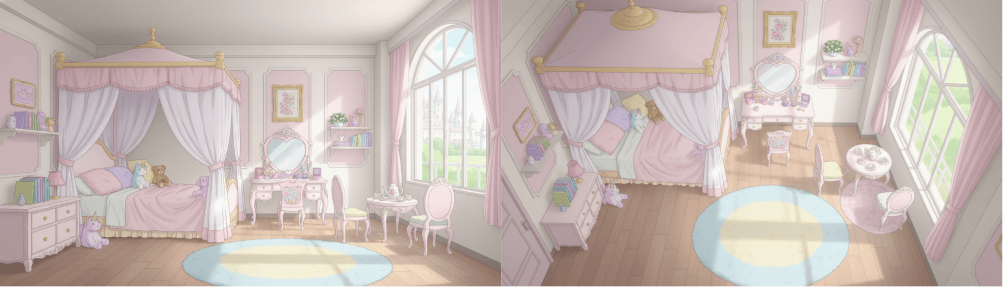
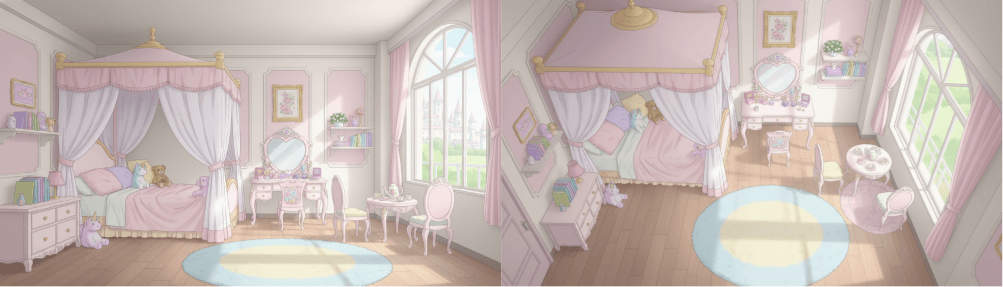
You can also generate the same room from different angles. While drawing interiors from scratch in multiple compositions is labor-intensive, the AI Assistant lets you prompt:
“Keep the room consistent and change to an overhead angle”
to quickly generate new compositions.
Step-by-Step: How to Create Background Composition Variations
- Prepare the base illustration
Choose a background image with a clear structure (buildings and interiors work best; purely natural scenes are currently more difficult). - Upload to copainter
Select the AI Assistant feature and upload the background image. - Choose an aspect ratio
Set ratios like 4:3 or 16:9 depending on usage.
(Aspect ratio adjustment is now a stable feature.) - Instruct composition changes via prompt
Use clear directions such as “bird’s-eye view” or “low angle.”
Adding phrases like “while maintaining building consistency” improves stability. - Generate and review
Results may vary on the first try, so refine prompts and select the most natural output. - Fine-tune
Adjust perspective or colors as needed to finalize a high-quality background.
Tips and Best Practices
Give specific instructions
In addition to text prompts, adding reference images of the desired angle can help. Being explicit about preserving elements like buildings or vehicles improves results.
Use high-quality input images
Low-resolution images are more likely to break during transformation. Use high-quality background art whenever possible.
Be patient (most important)
The AI Assistant is highly capable, but not always perfect on the first try. Adjust prompts and reference images patiently.
Using reference images similar to the original scene (rather than generic angle references) often yields better results.
Even with retries, the total effort is still far lower than redrawing backgrounds from scratch.
Use Cases
- Game development
Generate multiple map and event backgrounds from different viewpoints and combine them with character art. - Manga & Webtoons
Prepare many angle and time-of-day variations of the same setting for panel layouts. - Anime production
Efficiently create background cuts that match character motion, reducing animation workload. - Educational materials & advertising
Produce formal, consistent backgrounds in multiple variations for presentations.
Combining with Other copainter Features
Upscaling AI
If resolution is insufficient after generation, use copainter’s Upscaling AI to reach production-ready quality.
Image Transformation AI
If you have trained styles, you can apply them to generated backgrounds by selecting a trained model, keeping visual consistency.
Photo Background Transformation AI
Convert backgrounds into manga-style or anime-style looks. This works with both photos and illustrations and helps unify the overall visual tone.
What Else the AI Assistant Can Do
The AI Assistant can do much more than background composition changes. On copainter Learn, you can find guides on:
- Instantly changing character outfits
- Creating turnaround sheets
- Generating facial expression variations
Feel free to explore and experiment.
Summary
Changing background composition is essential for manga, anime, game, and webtoon production—but traditionally very costly.
With copainter’s AI Assistant, you can generate consistent background variations in a short time, dramatically improving both quality and efficiency.
If you’re looking to streamline your workflow and raise production quality, give copainter’s AI Assistant a try.
A free plan is available, so it’s easy to get started.
![[Free Download] Chibi Character Battle Pose Collection — Free for Copainter Users, Including Commercial Use](/content/images/size/w720/2026/03/header_pose-collection_battle-of-deformation-character-1.png)
![[Free Download] Female Battle Pose Collection — Free for Copainter Users, Including Commercial Use](/content/images/size/w720/2026/03/header_pose-collection_battle-of-woman-1.png)
![[Free Download] Male Battle Pose Collection — Free for Copainter Users, Including Commercial Use](/content/images/size/w720/2026/03/header_pose-collection_battle-of-man-1.png)