
Easily Generate Facial Expression Variations with AI! Streamline Character Design Using copainter’s AI Assistant
Facial expression variations are vital to character design. copainter’s AI Assistant quickly generates consistent expressions, reducing manual work and improving efficiency across games, manga, and webtoons.
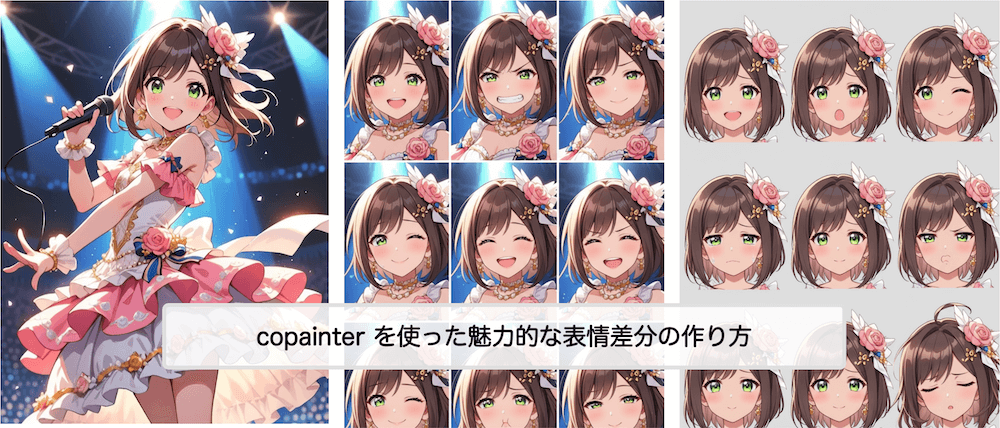
Easily Generate Facial Expression Variations with AI
In character design, facial expression variations are essential. A range of emotions—joy, anger, sadness, surprise—brings characters to life and adds realism and emotional impact to a work. However, carefully drawing each expression by hand while maintaining character consistency takes significant time and effort.
That’s where copainter’s AI Assistant comes in. In this article, we’ll explain how to efficiently create expression variations using AI, along with its benefits and practical tips.
What Is copainter’s AI Assistant?
copainter’s AI Assistant is a powerful feature designed to support character design. Based on an existing illustration, it can generate outputs such as turnaround sheets, pose variations, and more.
Because the AI builds on the original image while maintaining consistency, it can change only the facial expression without altering key elements like hairstyle, facial structure, or clothing.
Benefits of Creating Expression Variations with AI
Dramatically reduced production time
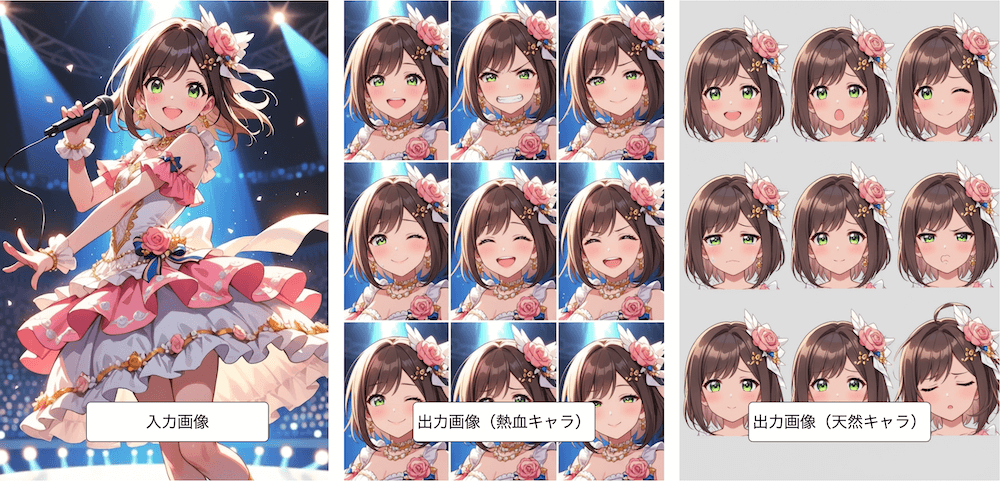
Manually drawing four or five expressions can take hours. With the AI Assistant, you can generate multiple expressions in just minutes—while specifying character traits such as tsundere, hot-blooded, or airheaded.
Strong consistency
Unlike older AI tools, the AI Assistant maintains facial balance and line style, resulting in a unified look across all expressions.
Fewer corrections needed
Because the output stays close to the original illustration, less manual adjustment is required, allowing you to reach a finished result faster.
AI Assistant Examples
Character expression variations
You can specify personality traits (e.g., energetic, innocent) and generate expression sets. You can also request more than four expressions—for example, “Create 9 expressions”—to generate multiple variations at once.
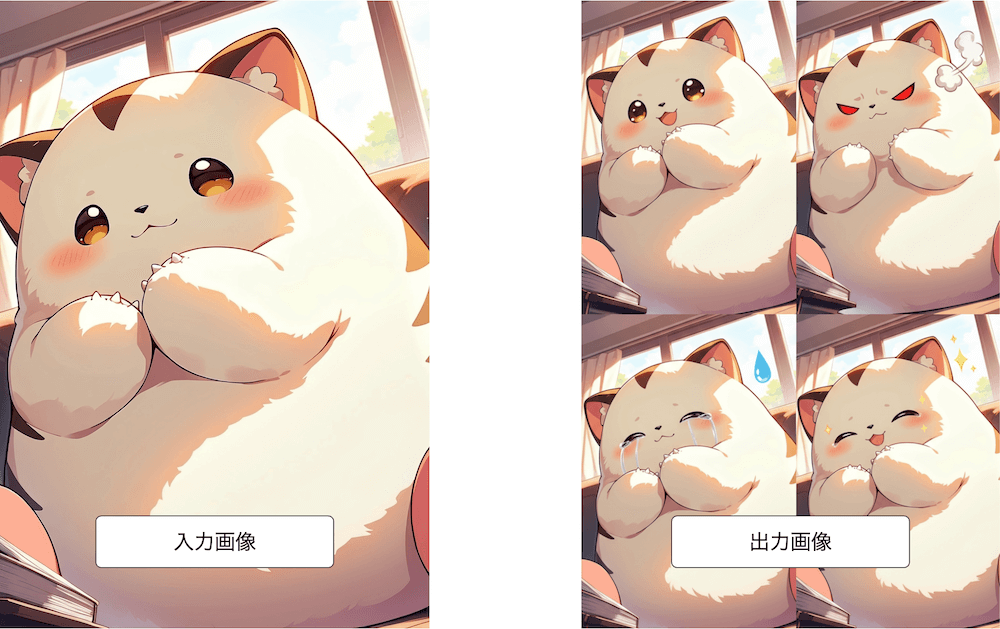
Monster expressions
The AI can also generate emotional variations for monsters.
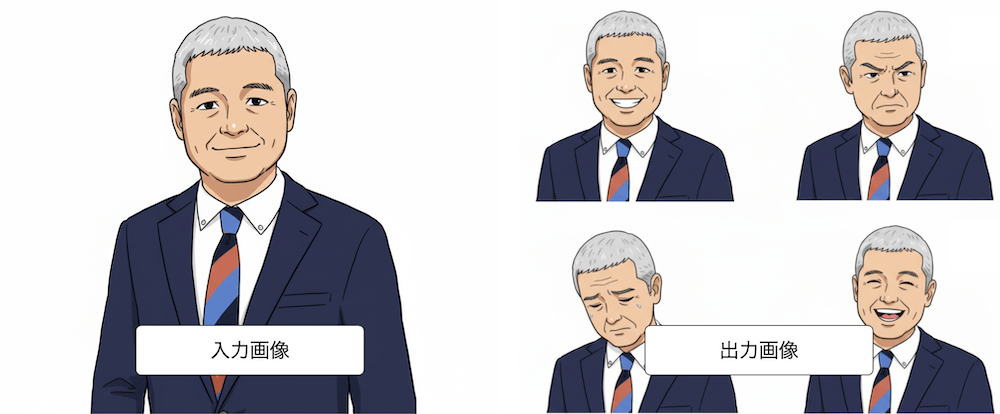
Formal illustrations
The feature works well for formal illustrations used in ads or corporate materials.
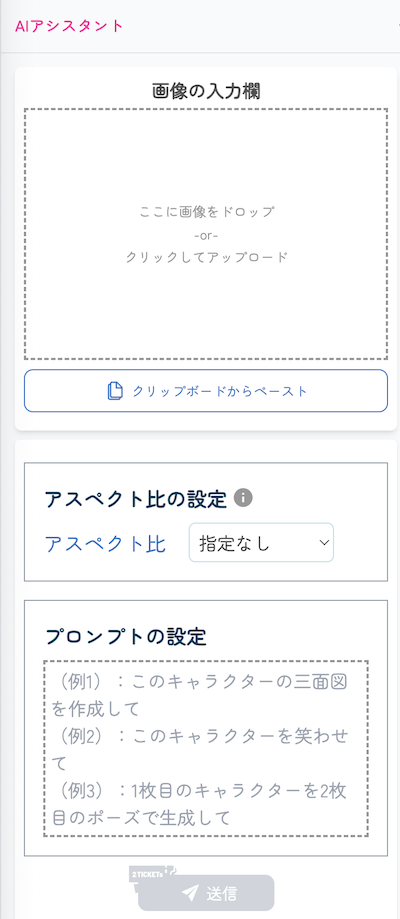
Step-by-Step: How to Generate Expression Variations
- Prepare the base illustration
Use a front-facing character image with clearly defined features. - Upload to copainter
Select the AI Assistant feature and upload your image. - Choose an aspect ratio
Select your desired aspect ratio.
Note: Aspect ratio adjustment is a beta feature and may occasionally fail. - Set the prompt
Specify emotions such as “smiling,” “crying,” “angry,” or “surprised.”
To generate multiple at once, use prompts like “Generate joy, anger, sorrow, and surprise.”
Adding instructions like “faithful to the original character” or “consistent style” can improve accuracy. - Generate and review
Select the most natural and character-accurate results. - Fine-tune if needed
Adjust details like eyebrows, mouth angle, or gaze manually for higher quality.
Tips and Best Practices
Give clear instructions
Instead of just “happy” or “angry,” use specific phrases like “gentle smile” or “tight-lipped anger.”
For very detailed prompts, generating fewer expressions (e.g., three instead of nine) often yields better results.
Use an image that clearly shows character traits
If facial features are unclear, the AI may change them too much. Choose an image that clearly represents the character.
Add personality traits for better results
Including character archetypes can help generate more fitting expressions, such as:
- Tsundere (aloof but kind)
- Yandere (obsessive love)
- Kuudere (cool and reserved)
- Clumsy, caretaker, sarcastic, cheerful, natural, hot-blooded, calm, optimistic, leader-type, strategist, mascot, guardian, and more
Maintain image quality
If the resolution is insufficient, use copainter’s upscaling feature.
Ensure consistency
Generate multiple results and choose the most natural one if differences appear.
Use Cases
- Game development: Batch-generate multiple expressions for character portraits
- Manga & webtoons: Quickly prepare emotional variations for main characters
- Education, ads, presentations: Add smile/neutral/surprised variations to presentation characters
This helps solve common issues such as long production times and inconsistent results.
Combining with Other copainter Features
Upscaling AI
AI Assistant outputs are around 1000px. Use copainter’s upscaling AI to enlarge images up to 4× for production-quality results.
Image Generation AI
You can generate the base illustration itself using copainter’s image generation AI, optimized for anime, manga, and game art.
Image Transformation AI
You can adjust the style of generated expressions by providing a reference image and instructing the AI to match its look.
More Than Expression Variations
The AI Assistant can do much more, including:
- Instantly changing outfits
- Modifying composition and camera angles while keeping background consistency
- Creating turnaround sheets
Feel free to explore and try it out.
Summary
Creating facial expression variations is an unavoidable step in character design. While traditionally time-consuming, copainter’s AI Assistant enables fast, consistent, and automated generation of expressions.
If you’re aiming to improve efficiency and quality in your projects, give copainter’s AI Assistant a try.
copainter also offers a free plan, so new users are welcome to test it out.
![[Free Download] Chibi Character Battle Pose Collection — Free for Copainter Users, Including Commercial Use](/content/images/size/w720/2026/03/header_pose-collection_battle-of-deformation-character-1.png)
![[Free Download] Female Battle Pose Collection — Free for Copainter Users, Including Commercial Use](/content/images/size/w720/2026/03/header_pose-collection_battle-of-woman-1.png)
![[Free Download] Male Battle Pose Collection — Free for Copainter Users, Including Commercial Use](/content/images/size/w720/2026/03/header_pose-collection_battle-of-man-1.png)