
Create Character Turnarounds with copainter’s AI Assistant | How to Streamline Character Design
Character turnaround sheets are essential for consistent design. copainter’s AI Assistant generates accurate front/side/back views quickly, improving efficiency for anime, game, and webtoon production.
What Is a Turnaround Sheet, and Why Is It Necessary?
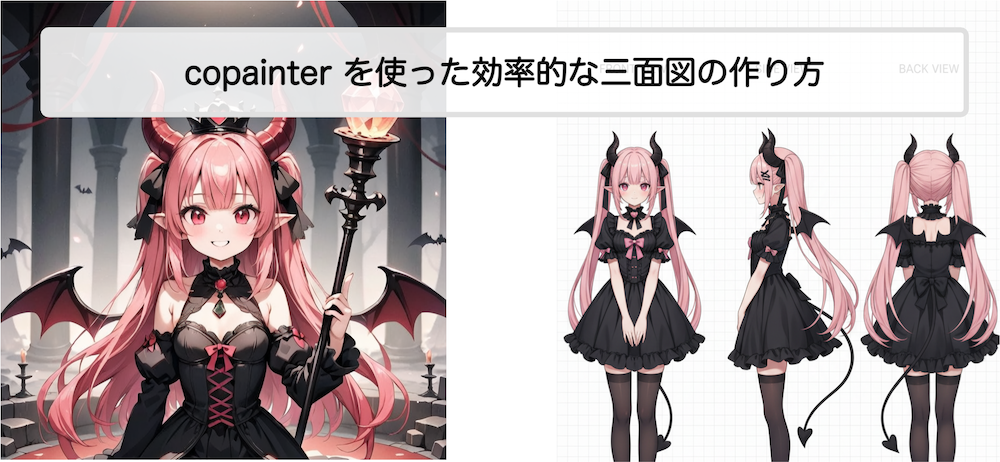
In character design, a turnaround sheet—showing the front, side, and back views of a character—is essential. In anime, games, and webtoons, characters must be depicted consistently from multiple angles, and having a turnaround sheet makes downstream production far smoother.
However, creating turnaround sheets from scratch is time-consuming and carries the risk of design inconsistencies. This is where the AI Assistant feature in copainter becomes extremely useful.
What You Can Do with copainter’s AI Assistant
Using the AI Assistant, you can streamline the following tasks:
Automatic turnaround generation
Simply upload a front-facing (or near front-facing) character illustration that captures key features, and the AI will estimate and generate the side and back views automatically.
Highly consistent output
With perceived accuracy of over 90%, the AI produces consistent results. Minor issues—such as slight facial imbalance or pattern shifts in clothing—may occur, but quick manual touch-ups can yield high-quality turnaround sheets in much less time.
Works for monsters too
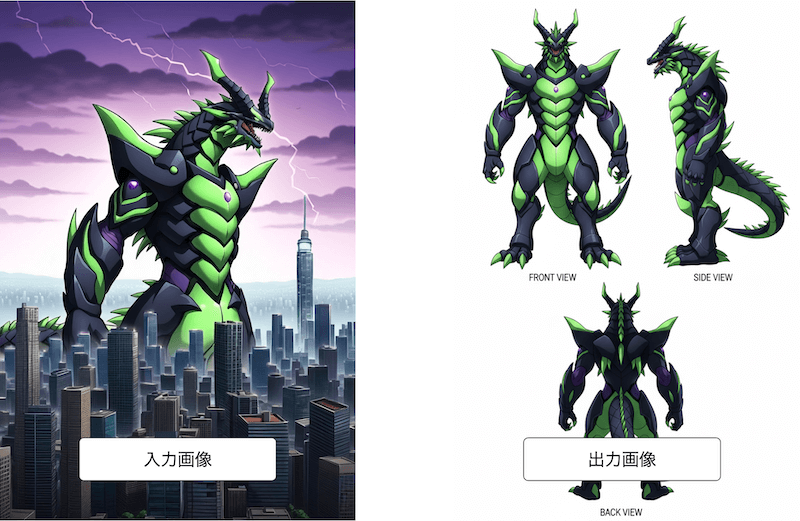
Not only humanoid characters, but also monsters can be turned into turnaround sheets, making this useful for manga, anime, games, and webtoon projects.
AI Assistant Examples
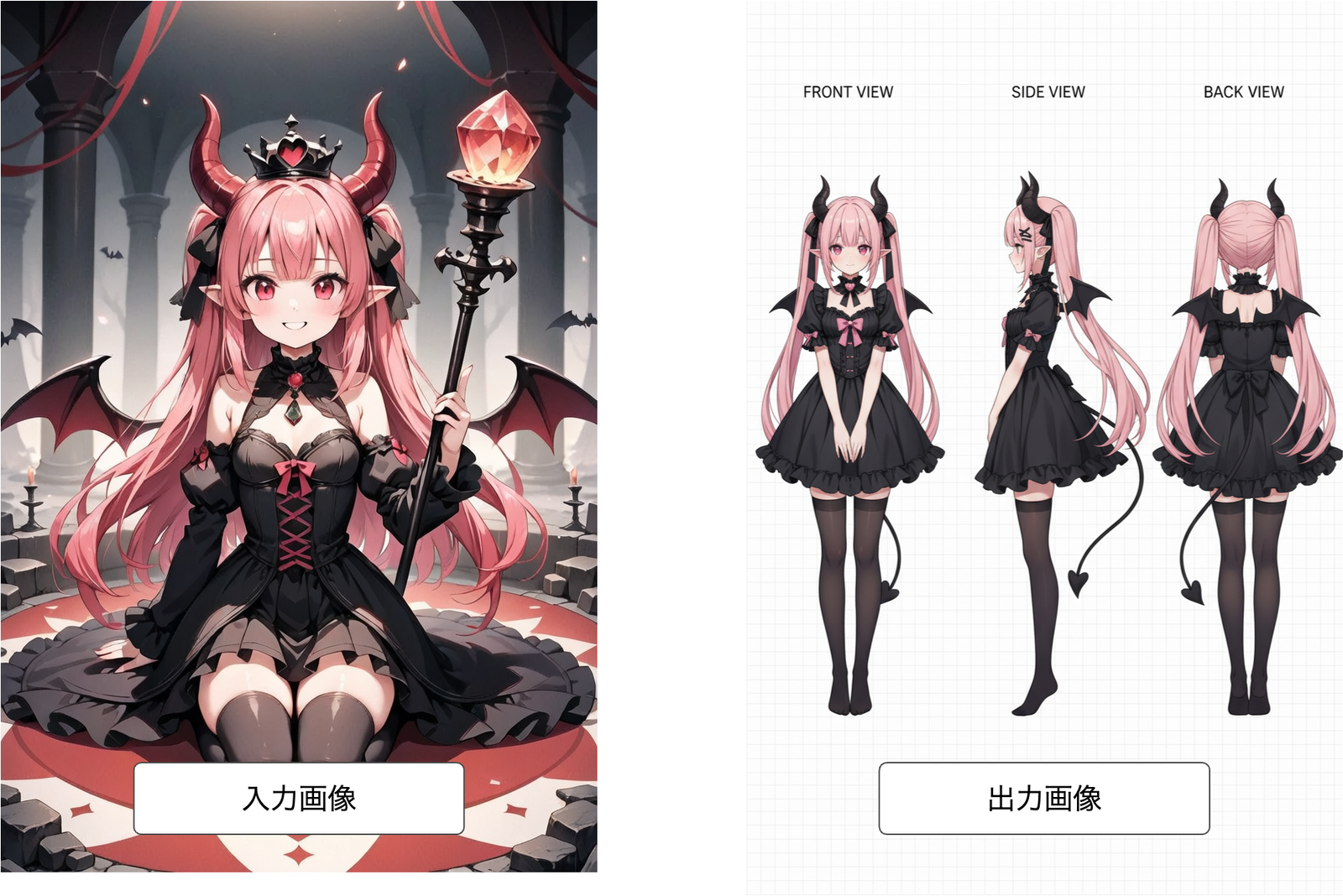
Creating turnarounds from seated characters
Even without a perfectly front-facing image, the AI can generate a turnaround.
Monster turnaround creation
Accurate results can be achieved even when the source illustration shows only the upper body.
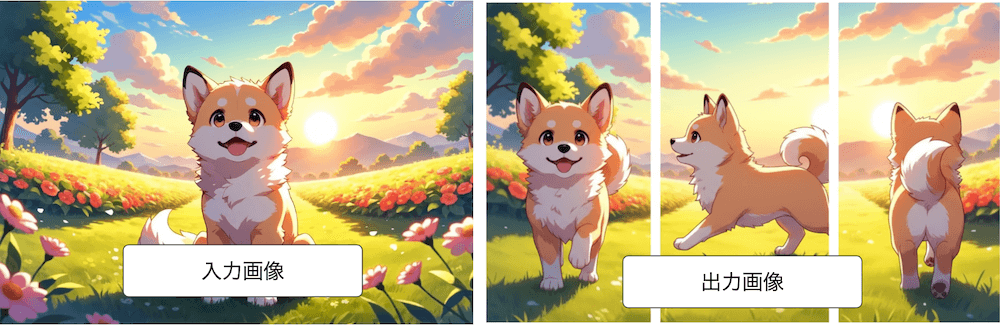
Animal turnarounds
You can also generate turnaround sheets for animals such as dogs. By instructing the AI to change poses (e.g., from sitting to walking), pose variations are possible. Adding “white background” to the prompt increases the likelihood of a white background.
How to Generate a Turnaround Sheet
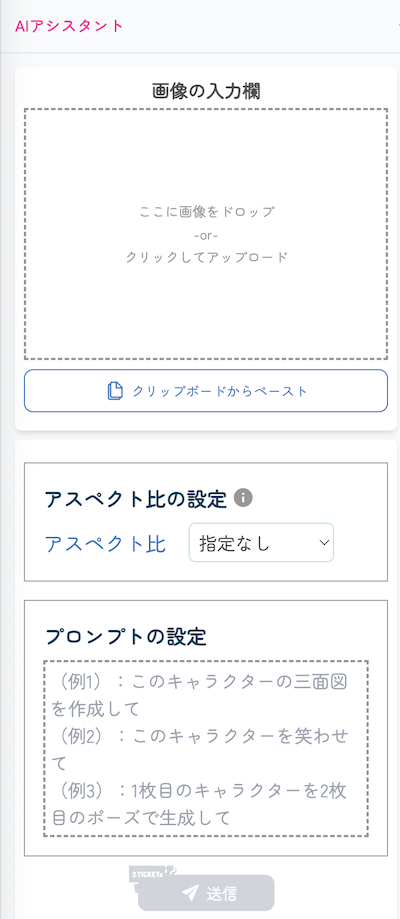
- Prepare a source image
Choose a high-quality, finished illustration. Avoid roughs or mid-process artwork. - Upload to copainter
Select the AI Assistant feature and upload your image. - Choose an aspect ratio
You can adjust the aspect ratio. For tall characters, 4:3 often works best.
Note: Aspect ratio adjustment is a beta feature and may occasionally fail. - Give the instruction
Add a prompt such as: “Create a turnaround sheet of this character.” - Make final adjustments
Fine details (accessories, hair movement, clothing patterns) are best refined manually after generation.
Tips for Better Turnaround Generation
Choosing the right source image
Use an image as close to front-facing as possible to preserve character traits. Side-facing images can work, but accuracy improves with clearer defining features.
Aspect ratio tips
For humanoid or square-proportioned characters, 4:3 or 9:16 helps align height properly. Wide characters may benefit from vertical ratios.
Prompt tips
AI-generated turnarounds tend to simplify details slightly. Adding instructions like “Create the turnaround faithfully to the original image” helps preserve detail.
You can also request variations, such as changing clothing colors.
Combining with Other copainter Features
Upscaling AI
AI Assistant outputs are around 1000px, which may be insufficient for production. Using copainter’s upscaling AI, you can increase resolution up to 4×, making the artwork production-ready.
Image Generation AI
You can generate the base character illustration itself using copainter’s image generation AI, optimized for anime, manga, and games.
Image Transformation AI
You can adjust the style of generated turnarounds by providing a reference image and instructing the AI to match its look and feel.
More Things You Can Do with the AI Assistant
The AI Assistant goes beyond turnaround sheets. It can also:
- Instantly change character outfits
- Adjust composition and camera angles while keeping background consistency
- Generate facial expression variations with ease
There are many possibilities—try it out and explore.
Summary
Turnaround sheets are the foundation of character design and greatly influence overall production quality. By using copainter’s AI Assistant alongside other AI features, you can create accurate, high-quality turnaround sheets in a fraction of the time.
If you want to significantly reduce the workload of character creation, give it a try.
![[Free Download] Children’s Poses Holding a Pencil — Copainter users can use it for free, including commercial use.](/content/images/size/w720/2026/01/header_pose-collection_kid-holding-a-pencil-1.png)
![[Free Download] Female Poses Holding a Pen — Copainter users can use it for free, including commercial use.](/content/images/size/w720/2026/01/header_pose-collection_woman-holding-a-pen-1.png)
![[Free Download] Theater Background Illustration (Landscape) — Copainter users can use it for free, including commercial use.](/content/images/size/w720/2026/01/header_background_theater-1.png)